


Blog
Remote-Control Bullet Vibrators: What Buyers Should Check

Unclear range claims, missing battery details, and confusing controls can turn a straightforward product into preventable returns and support requests.
Contents 7 sections
Before listing a remote control bullet vibrator, buyers should verify the controller type, realistic operating range, pairing process, power sources, materials, package contents, and care instructions. Every product claim should match the approved sample and manual.
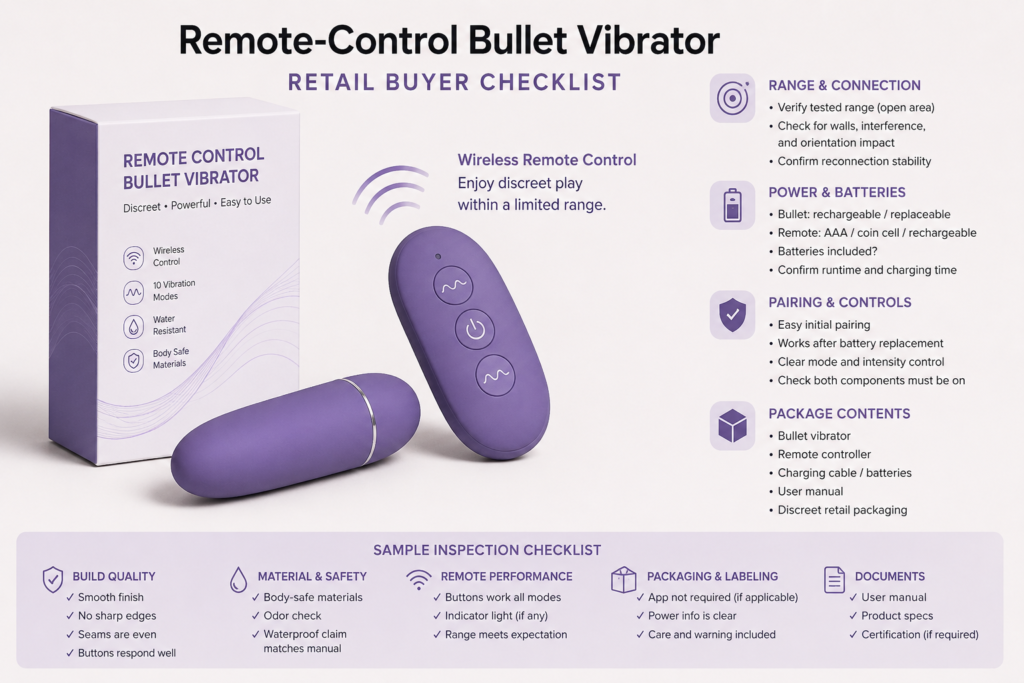
At WMCustomDolls, we list bullet vibrators within our broader adult toy selection and help wholesale buyers manage product selection, customization, production, and shipment communication.This guide focuses only on models with a separate wireless controller. It does not cover internet-based, long-distance app control or general vibration-pattern selection.
Remote Control vs App Control: What Is the Difference?
Calling every wireless product “remote controlled” can leave customers unsure whether they need a separate controller, phone, app, account, or internet connection.
A remote controlled vibrator uses a dedicated handheld controller, while an app-controlled model connects to a compatible phone. Retailers should state the control method clearly and avoid describing a local wireless remote as long-distance internet control.
A traditional wireless bullet vibrator generally includes a compact product and a separate physical controller. The controller communicates directly with the product over a limited local range. It normally does not require an app account, mobile phone, or internet connection.
An app-controlled model is different. It may use Bluetooth to connect to a nearby phone and may offer other functions through software. Those products create separate compatibility, privacy, account, and app-support considerations. Retailers should not mix those claims into a listing for a dedicated remote vibrator.
A clear comparison can prevent incorrect expectations:
| Specification | Dedicated remote control | App control |
|---|---|---|
| Main controller | Separate handheld remote | Compatible smartphone |
| App required | Usually no | Yes |
| Account required | Usually no | Depends on the app |
| Internet required | Usually no | Depends on the feature |
| Typical connection | Direct local wireless signal | Bluetooth or app-based system |
| Main support issues | Pairing, batteries, and local range | Compatibility, permissions, accounts, and software |
| Correct retail description | Wireless controller included | App-controlled or Bluetooth-enabled |
Retail teams should verify the actual product instead of relying on a title or supplier image. Some sets include both onboard bullet vibrator controls and a handheld remote. Others rely mainly on the controller after activation. The product page should explain which controls are available and whether both components must be switched on before use.
For category navigation, we recommend keeping “remote control” and “app control” as separate filters. This helps shoppers compare the correct products and keeps a local wireless controller from being mistaken for a long-distance feature.
What Should Buyers Confirm About Range, Batteries, and Pairing?
A maximum range figure can be misleading if it was measured in open space and does not reflect walls, interference, orientation, or battery condition.
Buyers should confirm whether the stated range is an open-space test, identify factors that may reduce it, and document the power source for both components. They should also test initial pairing, reconnection, and recovery after battery replacement or charging.
Wireless range is not a universal number. Signal performance may change because of walls, nearby electronic devices, product orientation, low battery levels, or obstacles between the controller and bullet. A supplier’s maximum figure should not become an unconditional promise on the retail page.
Ask for the range test conditions:
- Was the product tested indoors or in open space?
- Was there a clear line of sight between both components?
- Were both components fully charged or fitted with new batteries?
- Were obstacles or nearby wireless devices present?
- Does the controller use infrared, radio frequency, Bluetooth, or another system?
- Does the manual state a maximum or recommended range?
- What happens when the product moves outside that range?
Power specifications need equal attention. The bullet may be rechargeable while the remote uses a coin cell, AAA battery, or built-in rechargeable battery. A product page that says only “rechargeable” can mislead customers if this refers to one component rather than the complete set.
Use separate fields for each power source:
| Component | Details to confirm |
|---|---|
| Bullet unit | Rechargeable or replaceable battery |
| Remote control | Rechargeable, AAA, coin cell, or another format |
| Charging cable | Connector type and whether it is included |
| Disposable battery | Exact code, quantity, and whether included |
| Charging indicator | Light behavior described in the manual |
| Estimated runtime | Test basis and whether it applies to the bullet or remote |
| Storage guidance | Whether disposable batteries should be removed |
Pairing should also be tested from a new, unpaired state. Buyers should switch both parts off, restart them, replace or recharge their batteries, and confirm that they reconnect according to the manual. If a manual pairing sequence is required, put it in the quick-start guide instead of leaving customers to guess.
How Do Remote Features Affect Packaging and Instructions?
A compact controller can be overlooked, damaged, or discarded when packaging does not separate and identify every component clearly.
Remote-control packaging should secure the bullet, controller, cable, batteries, and instructions in clearly identified compartments. The quick-start guide should explain activation, pairing, controls, range limits, charging, cleaning, storage, and troubleshooting.
Retail packaging for a remote-control set needs more planning than packaging for a single-piece product. The insert should protect both electronic components during transport and make the controller visible when the box is opened. If a coin cell or another small battery is included, it should be secured and identified in line with applicable market and shipping requirements.
A complete package-content list may include:
- Bullet vibrator
- Dedicated wireless controller
- Charging cable
- Disposable battery, if included
- Storage pouch, if supplied
- Quick-start card
- Full product manual
- Care and safety information
The front or side panel should make “wireless remote included” easy to understand. However, packaging should not use “control from anywhere,” “unlimited range,” or similar language for a local controller. If a distance is printed, it should match the approved documentation and explain relevant test conditions.
Instructions should show how to identify the power, connection, and mode buttons. Icons alone may not be enough because a short press and long press can perform different actions. A numbered control diagram is often clearer for international retail programs.
For private label projects, the box, insert, product page, and manual should use the same names for the adult toy controls. If the package calls a button “power,” but the manual calls it “mode,” support teams may struggle to guide customers.
WMCustomDolls supports privacy-focused packaging as part of our sourcing and production coordination services.[2] Selected compact products may also suit custom packaging programs, depending on the model, order quantity, artwork, and project requirements.[1] Buyers can explore our OEM and private label support when planning branded packaging.
What Should Buyers Test During Sample Review?
An attractive approval sample is not enough if its remote disconnects, its buttons are unclear, or its cable and instructions do not match the final retail set.
During sample review, buyers should test surface quality, controls, power, charging, pairing, reconnection, range, noise, packaging, and instructions. Results should be recorded in an approved specification sheet for production and quality-control reference.
Our team recommends reviewing the complete retail-ready sample rather than an unpackaged product. The test set should include the proposed controller, cable, battery, box, inserts, labels, and manual.
Inspect the product and material
Confirm the exterior material using supplier documentation. Check whether the construction is silicone, ABS, silicone-covered ABS, or another stated combination. Avoid unsupported terms such as “medical grade,” “completely safe,” or “hypoallergenic.”
Inspect the surface for rough seams, gaps, discoloration, loose controls, or inconsistent logo placement. Buttons should respond consistently without sticking. Dimensions, weight, color, and material wording should match the specification sheet.
Test the controller system
- Start with both components switched off.
- Follow the manual’s activation and pairing sequence.
- Test every button and control combination.
- Move gradually away to review the usable range.
- Add normal indoor obstacles where practical.
- Allow the connection to drop and test reconnection.
- Recharge or replace batteries and repeat the process.
- Check whether one remote can accidentally operate another nearby sample.
- Record indicator lights and low-power behavior.
Testing several units can reveal whether performance is consistent. If multiple samples are paired in the same room, confirm how the system avoids unwanted cross-control.
Review care and water-protection claims
A remote and bullet may have different water-protection levels. Retailers should not assume the controller is water-resistant because the bullet has a documented waterproof claim. Cleaning copy must distinguish the two components and follow the specific manual.
Customers should switch off the set, clean only as directed, keep non-water-resistant controls and charging areas away from moisture, dry components fully before charging, and store them in a clean, dry place. Any damage to seams, caps, buttons, or charging points should be reviewed before further operation.
WMCustomDolls works with production partners and follows quality-control coordination intended to support consistency and buyer confidence. Buyers should still approve their own sample and acceptance standards before bulk production.
How Should Retail Copy Describe Remote-Control Bullet Vibrators?
Vague phrases such as “powerful wireless control” do not tell customers what is included, how the system connects, or what range they can reasonably expect.
A remote-control bullet listing should identify the dedicated controller, documented range conditions, power source for each component, package contents, materials, charging method, supported water protection, care instructions, and pairing steps. Avoid implying app or internet control.
Product writers should build copy from an approved specification sheet rather than from a competitor’s listing. This reduces the chance of copying an incorrect range, battery type, water-protection claim, or accessory list.
A useful specification block can include:
| Product-page field | Clear wording example |
|---|---|
| Control type | Dedicated wireless handheld controller |
| App required | No |
| Internet required | No |
| Stated range | Use the documented figure and test conditions |
| Bullet power | Built-in rechargeable battery |
| Remote power | Requires 1 × specified battery |
| Battery included | State yes or no |
| Charging cable | Name the connector and inclusion status |
| Onboard controls | State whether the bullet has its own button |
| Exterior material | Use the supported material description |
| Water protection | State separately for bullet and remote |
| Package contents | List every included component |
| Care | Follow the supplied product manual |
Avoid calling the product “long distance” unless it genuinely supports the meaning customers are likely to understand. A local wireless bullet should be presented through its documented operating range, not compared with internet-enabled products.
Retailers can also reduce uncertainty by adding a simple control diagram and short pairing guide to the image gallery. One image can label the bullet’s button, remote buttons, charging contact, and indicator lights. Another can show the complete package contents.
Material, cleaning, and safety information should remain clear but concise. State only documented material and water-protection details. Remind customers to follow the specific manual, keep the remote dry unless it has a supported water-resistance claim, and ensure charging points are fully dry before connection.
For related sourcing information, buyers can view our bullet vibrator wholesale selection or review the wholesale FAQ. WMCustomDolls supports mixed wholesale orders, flexible product selection, and OEM/private label projects for brands, distributors, and retailers.
FAQ
Is remote control the same as app control?
No. A remote-control model uses a separate handheld controller that communicates with the product over a limited local range. An app-controlled model uses a compatible smartphone and may involve Bluetooth, software, account, or internet requirements.
What should a remote-control bullet listing include?
Include the controller type, documented range and test conditions, power source for both components, charging details, onboard controls, material, water protection, package contents, pairing instructions, and care notes. All information should match the approved sample, packaging, and specific product manual.
How can buyers reduce support questions?
Test the complete retail set and provide a quick-start guide with labeled buttons, battery details, pairing steps, indicator meanings, and basic troubleshooting. Clear product images and consistent wording across the listing, package, and manual can also prevent confusion.
Conclusion
Clear range, control, battery, pairing, and care details help retailers reduce avoidable confusion. Contact WMCustomDolls for wholesale sourcing, mixed orders, packaging, or OEM/private label support.
Planning a Wholesale Order?
Share your product interests, estimated quantity and destination market with our team.
Request Wholesale Information