


Blog
What Are Vibration Patterns? A Simple Guide to Adult Toy Features

Too many buttons and mode names can feel confusing fast.
On this page 9 sections
Vibration patterns are the preset rhythms and pulse styles built into a device, separate from speed levels. They control how the motor starts, stops, pulses, or waves. Understanding patterns helps you compare features and choose a product that fits your routine.
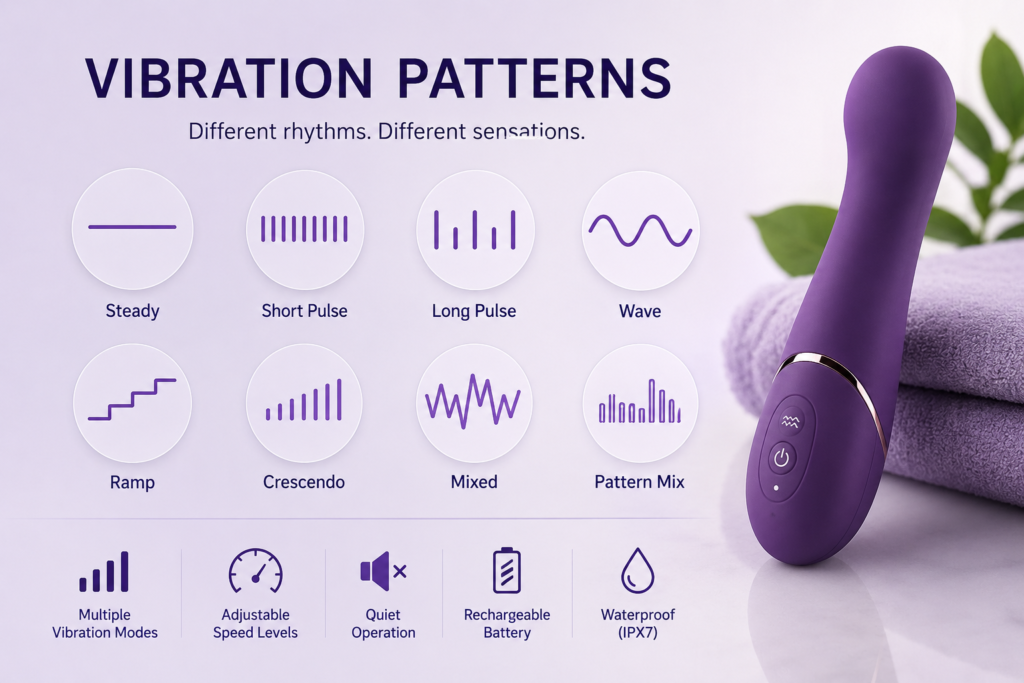
In this guide, we explain how patterns, speeds, and controls work together. We cover common settings, bullet vibrator options, remote and app features, and practical buying tips. Then we add one short section for brands and retailers planning packaging and product pages.
What Are Vibration Patterns?
Unclear mode names can make even simple products feel advanced.
Vibration patterns are rhythmic motor sequences—steady, pulsing, waves, or escalating—that change feel without changing speed levels. Patterns sit alongside speeds, so you can combine a chosen speed with a chosen rhythm.
Think of a device as offering two layers of control. First, speed levels: low, medium, high (and sometimes more). Second, the pattern layer: steady buzz, short pulses, long pulses, up-and-down waves, or stepwise crescendos. Together, these create “modes.” For example, Speed 2 + Pulse pattern feels different from Speed 2 + Wave. Many products save the last-used mode, which makes quick restarts easy. Buttons may cycle in a loop or offer plus/minus shortcuts. In our experience as wmcustomdolls, the best user experience comes from clear icons and a simple control layout. If you prefer predictability, start with steady patterns. If you like variety, try pulse and wave styles and note which rhythms feel smooth and easy to control. This is also where material comfort matters—soft silicone housings often reduce hand buzz and help you focus on the selected mode. If you’re just starting, explore silicone adult toys for comfortable finishes and simple care.
Common Types of Vibration Settings?
Similar names can refer to different rhythms across brands.
Common settings include steady, short pulse, long pulse, wave, ramp, crescendo, and mixed sequences. Names vary, so compare icons and sample animations on packaging or manuals to understand the actual rhythm.
Below is a quick map of popular patterns and how they’re often labeled:
- Steady: constant output at the chosen speed. Often called Constant or Classic.
- Short pulse: rapid on/off beats. May be labeled Pulse or Beat.
- Long pulse: longer on/off cycles. Sometimes called Throb.
- Wave: smooth rise and fall. Often called Wave or Sine.
- Ramp: steps up, then repeats from low. Sometimes Level Up.
- Crescendo: climbs from low to high, may hold briefly, then resets.
- Mixed: cycles several rhythms. Labeled Pattern Mix or Sequence.
A simple way to compare is to ask: how many “pauses” per cycle, how long do they last, and do transitions feel smooth? If a device lists “10 modes,” it might mean three speeds plus seven unique patterns, or ten total rhythm options with speed controlled separately. Check the manual’s chart or icons to see what “modes” actually include. Some rechargeable vibrator lines add dual-motor modes, where one motor runs steady while another pulses, creating an alternating feel. Some app-enabled models may offer audio-responsive modes, depending on the product design. If you prefer consistency, choose steady and wave. If you want variety, mixed sequences keep exploration simple without constant button presses.
Why Speed Levels Matter?
Too few speeds can feel limiting; too many can feel busy.
Speed levels control intensity, while patterns control rhythm. Start low and step up until the motor feels smooth and comfortable. More speeds are only helpful if the buttons make switching easy.
Speed is the backbone of control. Low speed often feels softer and helps you learn a device’s handling. Mid speed is a common daily setting because it balances sensation with battery life. High speeds draw more power and can create hand buzz, so a quality silicone exterior and ergonomic shape help with comfort. If a product lists “20 modes,” it may combine multiple speeds with multiple patterns; the key is how quickly you can reach your favorite combination. We like simple plus/minus or dedicated pattern buttons for quick access. For beginners, three to five speeds usually cover everyday use without overwhelm. For experienced users, more granular steps can be useful, especially in larger devices with stronger motors or in a compact bullet that needs fine control.
Battery life also links to speed. Higher speeds drain faster, so a device with a strong high setting benefits from a reliable battery and a clear charging indicator. If runtime matters, compare posted runtimes at medium settings, not only at low.
Bullet Vibrators and Vibration Modes?
Small size often means focused control decisions.
Bullet vibrator settings usually trade fewer buttons for quick, memorable modes. Expect several solid speeds and a handful of rhythmic patterns. Look for a clean on/off path and easy return to your favorite mode.
Bullets prioritize compact size, so controls have to be simple. Many offer a single button that cycles through steady speeds and a few patterns; others add a longer press for on/off and short press to toggle modes. If you care about returning to a preferred mode fast, check whether the device remembers your last setting. Some bullets include magnetic charging and a small LED to show charging/charged states. Because bullets are small, motor vibrations can travel to the hand more directly; a silicone coating helps soften that feel. When comparing bullet vibrator settings, consider:
- Speed steps: at least three is practical; five feels refined.
- Pattern clarity: pulses should be distinct, waves should be smooth.
- Button feel: a crisp click prevents accidental double-presses.
- Charging: magnetic ports make sealing easier; USB-C with a plug can also work if sealed properly.
Finally, choose patterns that match your rhythm preferences. Steady and wave are common daily picks, while pulse adds variety when you want a different feel without changing devices.
Remote Control and App-Controlled Features?
More control options can simplify or complicate routines.
Remote control vibrator features add distance control, quick switching, and sometimes app-based custom patterns or music sync. Check pairing steps, range, and whether the device works offline with saved modes.
Remotes can be helpful if buttons are small or hard to reach. A basic remote usually offers start/stop, speed up/down, and pattern toggle. App-enabled models may add custom pattern creation, saved favorites, and sound-responsive modes. If you prefer reliability, confirm the device still runs a full set of modes without an app. For range, most remotes cover typical room distances; walls and interference can reduce performance. App features depend on phone OS and permissions, so review the app page for compatibility. Practical tip: ensure the travel lock works both on the device and through the app to prevent accidental activation. If sharing control with a partner, test how mode changes are indicated—lights, gentle pauses, or notification tones—so you can keep track without confusion. As with any rechargeable vibrator, keep both device and remote charged and stored together in a pouch for quick access.
How to Compare Features Before Buying?
Feature lists can look the same until you read the details.
Compare vibration patterns, speed count, control layout, runtime, charging type, and material finish. Choose devices with clear icons and manuals. If unsure, start simple: steady + wave patterns with 3–5 speeds.
Here’s a quick comparison table you can use:
| Feature | What to Check | Why It Matters |
|---|---|---|
| Patterns | Steady, pulse, wave, ramp, mixed | Defines rhythm variety |
| Speeds | 3–5 steps or more | Controls intensity and battery life |
| Controls | Plus/minus vs single button | Fast access to favorites |
| Battery | Runtime at mid speed | Realistic day-to-day use |
| Charging | Magnetic vs USB-C plug | Sealing and convenience |
| Material | Silicone exterior | Soft touch, less hand buzz |
| Memory | Last-mode recall | Saves time each session |
When reading packaging, scan for icons that summarize these points. Many boxes show pattern icons, speed counts, magnetic charging symbols, and runtime estimates. We suggest starting with a device that emphasizes clarity over sheer mode count. It’s easier to build confidence with a predictable steady mode and a smooth wave mode than to manage a long sequence of similar pulses. If you want a soft-touch finish and simple care, browse silicone adult toys. For wholesale or curated assortments, our team can also help you evaluate feature sets across price ranges.
Why Clear Feature Labels Matter for Adult Toy Brands?
Confusing labels cause returns and mixed reviews.
Brands and retailers benefit from standardized icon sets, mode charts, and simple copy. Clear naming for vibration patterns, speed counts, and charging types speeds decisions and reduces support tickets.
For B2B teams, align spec sheets, packaging, and product pages so the same terms appear everywhere. Use a shared icon library for steady, pulse, wave, and mixed patterns. Call out speed steps and whether modes are pattern-only or pattern-plus-speed. Include basics like: magnetic charging icon, runtime estimate at mid speed, and a travel lock symbol. A small insert with a mode map—“3 speeds + 7 patterns, last-mode memory”—answers the top questions at a glance. When planning private label, pilot a small mixed order to verify button feel, LED behavior, and mode memory across batches. At wmcustomdolls, we often support partners with copy templates and packaging proofs as part of OEM and private label support. If you’re building a catalog, we can help compare feature sets and runtimes across tiers through our adult toys wholesale coordination.
FAQ
Are more vibration patterns always better?
Not necessarily. Variety is nice, but clear controls and a few well-tuned patterns—steady, pulse, and wave—often matter more. Start simple, then add variety once you know your preferences.
How many speeds should a beginner look for?
Three to five speeds cover most needs. They provide meaningful steps without overwhelm. Look for easy plus/minus controls or a short path back to your favorite speed.
Do bullets and full-size devices share the same modes?
Often, but bullets may offer fewer total modes because of size and button limits. Many still include steady, pulse, and wave, with 3–5 speeds for practical control.
Can I save my favorite pattern in an app-controlled toy?
Many app models allow saved favorites and custom patterns. Check the app page for your phone’s OS support and confirm the device works offline with at least the core modes.
Does material affect how patterns feel?
Yes, surface and shape influence sensation and hand buzz. Silicone shells often feel softer and reduce vibration in the hand. Shape also affects how patterns present at contact points.
Conclusion
Clear vibration patterns, sensible speed steps, and simple controls make buying easier. If you need help comparing features or planning a lineup, contact wmcustomdolls for guidance and sourcing support.
Planning a Wholesale Order?
Share your product interests, estimated quantity and destination market with our team.
Request Wholesale Information